Architectural overview
This document provides an overview of the architecture and third party services we use to deploy Clustered HA GitLab solutions on AWS. Each environment is deployed in isolation, as explained below. We use the words 'environment', 'solution' and 'cluster' interchangeably to refer to a separate deployed clustered instance of GitLab managed by GitLabHost.
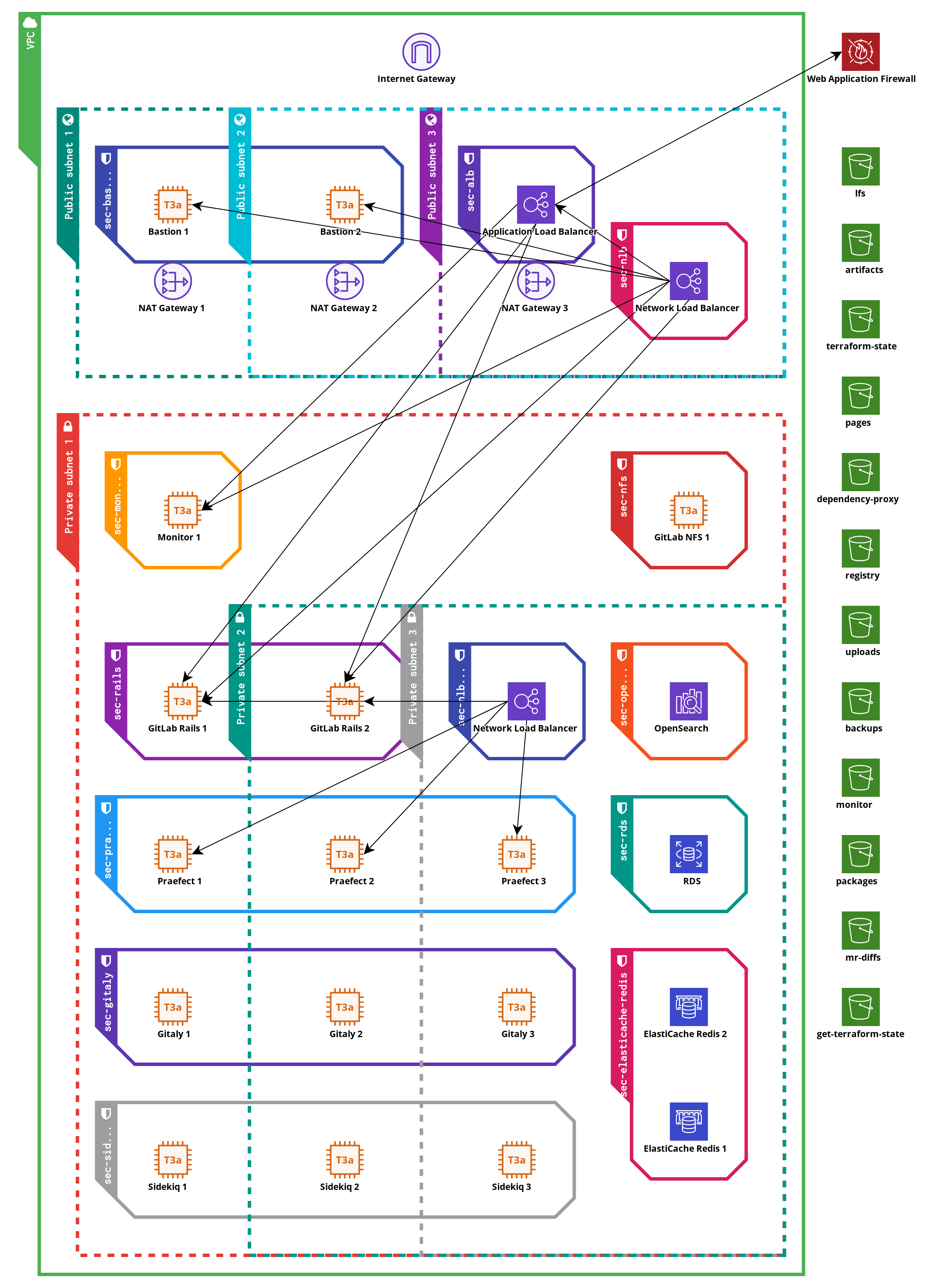
The architecture used by GitLabHost is using the recommendation from upstream GitLab as explained in their GitLab on AWS and GitLab Reference Architecture documentation. The diagram below provides a visual overview of the different components and how they interact with each other. The pieces are explained in detail below the diagram.
Administrative separation
For all clusters on AWS, we use the AWS accounts service to create an empty namespace for all the cloud objects used to reside in. We can control the access to these accounts on a per-role and per-user basis to ensure only required personnel in GitLabHost is able to access the data inside the cluster. This also prevents access from one cluster to another. The access to the account is controlled by the parent AWS account, which does not facilitate direct access to the data in the subaccount.
This is also applicable for multiple environments targeting the same customer, we have separate accounts for testing and production environments.
Furthermore, each cluster has its own Git repository to store the configuration for that cluster, of which any sensitive or secret data is encrypted with a unique passphrase stores in our 1Password vaults.
Generic components and security between components
Provisioning tools
At GitLabHost, we use Terraform to provision objects in the cloud, and Ansible to provision content on Linux machines. The codebase for this is contained in our version of the GitLab Environment Toolkit (also called GET). This codebase is versioned by Git tags, and we have internal migration documentation for upgrading between versions.
All Ansible-managed machines share a 'common' role, which installs the system users, basic OS and networking configuration. Each machine is provisioned according to its own role, which is determined by the core task of that system. A system is usually a virtual machine running Debian Linux, which in AWS terms is called a EC2 instance.
AWS security groups
Each EC2 instance has at least one security group, which is an AWS construct to provide firewall-like protection within the AWS virtual networking constructs. Security groups can also be attached to, or refer to, AWS cloud components, which would be impossible with a traditional firewalling package on the Linux nodes. The security groups define expected network traffic between cloud objects, EC2 instances, or to/from the internet. Any other traffic is refused.
In addition to the per-role security group, most EC2 instances also have a 'common' security group attached, which allows the machine to fetch data from the internet over HTTP/HTTPS. This can be disabled or scoped to CIDR blocks based on customer needs if required.
IAM instance roles
AWS requires credentials if machines want to access non-public AWS cloud resources over the REST API. Instead of settings a static access key and secret key on each machine, we utilize IAM instance roles to grant a EC2 instance a set of permissions, which by using the AWS SDK, software can then retrieve temporary credentials for within the scope defined by the permission set.
As an example, this is utilized for granting access to specific object storage buckets within AWS S3 from certain AWS EC2 instance.
The temporary and scoped nature of the credentials ensure that any leaked sessions tokens will not function outside the EC2 instance that requested these credentials, and that an attacker is not able to get permanent access to AWS components in case of a compromised EC2 instance.
AWS KMS encryption
Where supported, we use customer-managed AWS KMS keys that encrypt all data via the AWS KMS system. These encryption functions are carried out by AWS, but allow management of (but not insight to) the key material. This prevents any other AWS customer sniffing or scraping data from one of our systems from within their own accounts.
We use IAM roles and policies to specify which services or EC2 instances are allowed to use certain keys, preventing access to (for example) the Backup KMS key from a web worker instance.
Maintenance access
GitLabHost staff needs to access the EC2 instances within the cluster to perform regular maintenance, such as installing the latest GitLab version, of perform platform updates. We install the AWS Systems Manager Agent on all EC2 machines, which can provide a user shell on a EC2 system using AWS native authentication mechanisms. This feature is called the AWS Systems Manager Session Manager.
By default, we also use traditional SSH to access the EC2 machines.
The machines are not connected to the internet directly, instead we deploy a set of 'bastion' nodes behind a
load balancer. The security groups that are applied only allow traffic from known GitLabHost IP ranges to connect.
The bastion nodes are plain Debian Linux EC2 instances with no other software installed. We utilize SSH ProxyCommand
features to connect to the correct EC2 machines inside the private network via the bastion nodes.
Cloud-managed components
At GitLabHost, we like to focus on what we do best, which is providing the best managed hosting and support around GitLab on European soil. To aid us in doing this, we defer some management of required components to AWS Cloud, so we can stay focused on our core product instead.
AWS RDS
RDS provides relational databases, and in our case, we utilize PostgreSQL compatible RDS services to provide GitLab with a database backend. This backend is used for the GitLab application database, and the tracking database for Gitaly Cluster. We follow AWS recommendations for backups and uptime on production-class clusters, which in practice means that we have a standby database node that is also used as a read replica, and we use point-in-time backups alongside regular snapshot to have a very wide restore window in case of issues. AWS handles all database maintenance for us, and perform automatic fail-over in case of hardware maintenance. GitLabHost still determines which version of the database runs and when this is upgraded.
AWS ElastiCache
ElastiCache provides in-memory database, which in our case is Redis compatible. GitLab uses Redis for caching slow database queries, but also as a queueing system for background tasks. We utilize and deploy ElastiCache in the same fashion as RDS explained above.
AWS OpenSearch
If a customer wants to use GitLab Advanced Search features, we use AWS OpenSearch to provide a backing database for the search index. OpenSearch is ElastiCache 6.x compatible, which is the version required by GitLab.
AWS S3
Perhaps the best known AWS service of all is AWS S3. S3 provides object storage. Compared to traditional virtual disks or network mounted filesystems, object storage does not provide a POSIX style API at all, instead only providing access over HTTP. We use S3 wherever possible, since it provides a cost-effective way to store binary data without having to deal with traditional layers such as filesystems and (virtual) disk sizes. Some components where S3 is used:
- Gitaly Backups, we export Git repository data into a Git bundle file and upload that file into S3.
- Logs and Monitoring metrics, via Loki and Thanos. These systems are not customer-facing.
- If runners are also hosted by GitLabHost:
- Shared Runner cache
- Storage backend for Docker Hub caching
- GitLab object storage, which is used as a backing storage for the following features:
- Docker Container registry
- GitLab Package registry
- Terraform state registry
- User uploads, such as avatars or attached files to issues and comments
- LFS objects
- and more.
All S3 buckets have public access disabled, and have versioning enabled. All S3 buckets are managed by the AWS Backup service, which provides point in time recovery as well as snapshots of the full bucket contents. Users are not granted direct access to the S3 endpoint, all access is gated and proxied by the main web frontends. This ensures that users always connect to known endpoints and IPs, so customers can allow the full GitLab instance in their firewalls if required. Only services required to have access to a S3 bucket are allowed as such, via the IAM roles as explained earlier in this document.
AWS Load Balancers
For distributing traffic across multiple backend nodes, we use AWS managed Load Balancers. Both traditional network load balancers (NLB) as newer application load balancers (ALB) are used. The primary web interfaces are accessed though an ALB, which understands the HTTP protocol and thus can be used to provide backend stickiness on a per-session basis. We also utilize the AWS Web Application Firewall services that hooks into the ALB, to provide early filtering on generic outside attacks and overload requests.
By having the load balancers managed by AWS, we can ensure the highest possible uptime, since any fail-over or scaling of the load balancing nodes is done transparently by AWS on a low networking level. If GitLabHost were to manage the load balancers themselves, we would have to perform these actions on a DNS level instead, which has a much higher response time in case of load balancer failure, and is reliant on cooperation from the users networks as well.
In addition, we also use some load balancers without public IP addresses attached, for handling traffic between internal components.
AWS VPC
AWS VPC is a construct to create a virtual LAN for EC2 machines and other AWS services to live in. We subdivide the LAN into a 'public' and a 'private' subnet, replicated in each availability zone provided by AWS (usually three).
All traffic from the private subnet needs to flow through a NAT gateway to access the internet. This provides fixes IPv4 addresses where all traffic going out of the cluster originates from. Customers can use these addresses in their corporate firewalls to grant access to services for the GitLab cluster where required, for example to have a webhook in GitLab trigger an on-premise service.
GitLab components
This subsection lists all different node types in a fully-fledged GitLab cluster. Every node only has one role, so we can estimate system performance requirements better and provide performant services without wasting hardware resources. All the components below run on EC2 instances.
GitLab Rails node
Even though this node gets its name from the core web component of GitLab, this is the primary user-facing node. The following services run on this node, a small explanation of the service is included as well.
- Nginx and GitLab Workhorse - these components receive incoming HTTP(s) traffic and redirect the traffic to the correct backend services on the local machine.
- GitLab Rails stack via Puma - this is the main webserver of GitLab. Both the web interface and the GitLab APIs are served by this service.
- GitLab container registry - this daemon serves all Docker / OCI registry related content. This is pending replacement with the next generation GitLab registry when that becomes stable.
- GitLab-SSHd - this daemon provides Git over SSH connections. We do not use OpenSSH for this, instead we use GitLab SSHd. The main advantages of this, is that we can update the daemon in cadence with all other GitLab components, and to lower the attack service by not having all OpenSSH features which are not required for Git over SSH traffic installed.
- GitLab Pages - this serves the GitLab pages contents. When the custom domains feature is required this service needs to be split off to a separate node, as described below.
All these services are on the same node type, since this is the combined main entrypoint for GitLab for users. This allows us to quickly and accurately scale based on usage while keeping a good balance between different hardware type usages.
Sidekiq node
Sidekiq is used by GitLab to process background tasks. Examples of background tasks are calling webhooks and sending out emails. These tasks are not required to execute immediately and may take some time to execute, so they are performed by the background task system.
Gitaly cluster
Gitaly cluster is a custom solution by GitLab to provide highly available storage for Git repositories. Unlike most content stored in GitLab, Git data needs to exist on a POSIX compatible disks, and relies on many POSIX style semantics of the machine. Because the application relies on voting algorithms, Gitaly cluster is always deployed on at least 6 nodes in total. There are two subtypes of nodes that are part of a working Gitaly cluster.
Gitaly node
The Gitaly nodes are the backend storage nodes of a Gitaly cluster. These are the only nodes in our cluster setup that have large permanent disk space attached. The Gitaly nodes perform Git operations on repositories when requested by a coordinating node.
We deploy the Gitaly nodes in sets of three as per the upstream recommendations for creating a voting quorum. We ensure that these three nodes are deployed in different availability zones for maximum resilience to downtime.
Praefect node
The Praefect nodes are the 'gatekeepers' of a Gitaly cluster. These nodes connect to a SQL storage to keep track of available repositories and coordinate replication inside the cluster. It's supported to have multiple different backend storage nodes that do not necessarily store all available repositories, in a sharding like fashion. In this case, the Praefect node also coordinates which backend node the incoming request is sent to.
We deploy the Praefect nodes in sets of three as per the upstream recommendations for creating a voting quorum. We ensure that these three nodes are deployed in different availability zones for maximum resilience to downtime.
Additional components
We run some additional services for optional GitLab features and to observe the cluster performance. These services are listed below. All these roles run on EC2 instances.
Kroki
Kroki can be used in GitLab to render diagrams in different languages and formats. The actual rendering is done by the Kroki nodes. The traffic to and from the Kroki nodes is proxied by the GitLab Rails nodes.
GitLab Runner
We provide two types of GitLab Runners at additional cost. Both runners can only run jobs using the Docker executor. Runners needs to be connected manually to the instance by GitLabHost staff.
We can either provide dedicated runners, which are permanently active EC2 instances with GitLab Runner and Docker installed, which runs jobs locally, or autoscaling runners. Autoscaling runners utilize the main EC2 instance as a coordinator, and will create a new EC2 instance per job for complete isolation. The instance is removed when the job terminates. This architecture can also scale up, providing on-demand runner capacity on large instances.
If the instance is shared by multiple teams and/or departments within a company, or is shared with third party developers, we highly recommend using autoscaling runner since they provide full isolation between jobs.
Registry mirror
Because of the rate-limits on Docker Hub, but the reliance of many publicly available Docker/OCI images that are on the Docker Hub, we provide a Registry Mirror service which acts as a pull-through cache for Docker Hub. Any images that are pulled are stored in S3 for 90 days, and if they are requested again, they will be served from the S3 bucket instead of being pulled from the Docker Hub. We install a service account on these nodes managed by GitLabHost to up the default rate limits to acceptable levels.
Observability stack
These services are not available to customers, but are used by GitLabHost staff to monitor and debug the cluster health. We use the following software components, spread out over nodes at GitLabHost's discretion:
- Loki - a centralized logging system. Log data is stored in S3 for long-term archival.
- Prometheus + Alertmanager + Thanos - a metrics collection system. We collect system resource stats, but also output from components that support it, such as GitLab metrics for Gitaly to ensure the distribution between nodes is good.